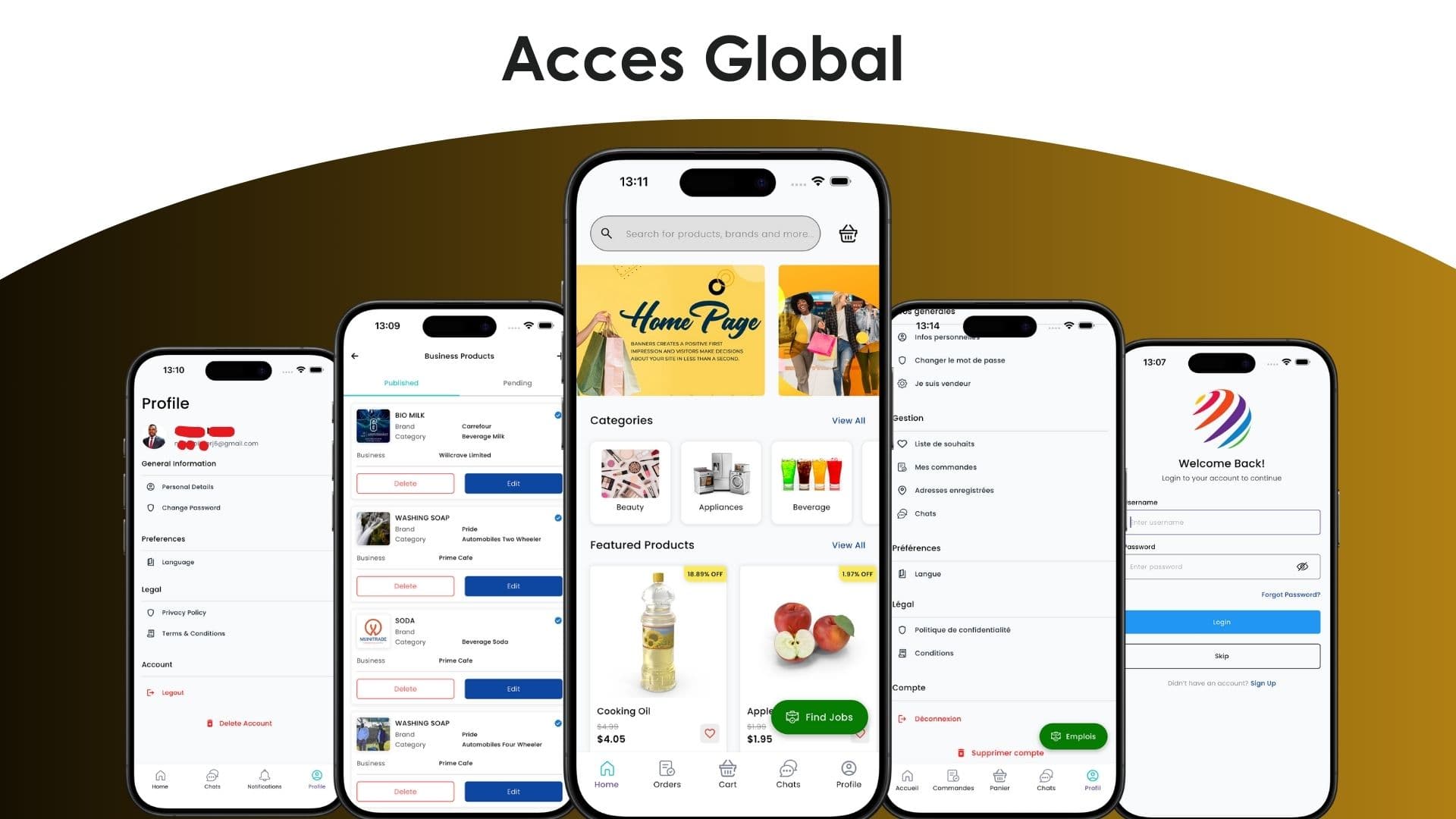
Acces Global: A Multi-Vendor Marketplace
Multi-vendor marketplace apps look simple from the outside — a product feed, a cart, a checkout — until you add a second business domain on top and ask one codebase to serve both cleanly. That's what building Acces Global taught me.
What is a multi-vendor Flutter marketplace?
A multi-vendor marketplace app lets independent sellers list and manage their own products inside a single mobile app, instead of each vendor running a separate storefront. Built in Flutter with BLoC state management, Acces Global extends that model with a second module — job listings — so shoppers, job seekers, and vendors all share one codebase and one API layer.
Acces Global combined shopping and job discovery with a second, unrelated domain inside one Flutter codebase, so the biggest engineering challenge wasn't the UI — it was keeping shopping, jobs, and vendor management from turning into one tangled state tree.
The brief
Acces Global was built for Mijini Tech, targeting the Congolese market. The app needed to support three distinct workflows in a single cross-platform (Android + iOS) codebase:
- Shopping — browsing and filtering products across multiple independent vendors
- Jobs — discovering job listings and applying from within the app
- Vendor dashboard — letting vendors manage their own products, job postings, and applicants, all from their phone
TODO: add exact vendor/product counts and launch metrics once available from the client.
Why BLoC, not just Provider or Riverpod
With three modules that don't share business logic but do share auth and navigation state, the risk was state leaking between features — a vendor dashboard update accidentally re-rendering the shopping feed, that kind of bug. I used the BLoC pattern to give each module its own isolated bloc/cubit, with a clean separation between UI and business logic:
class ProductListCubit extends Cubit<ProductListState> {
  ProductListCubit(this._repository) : super(ProductListInitial());

  final ProductRepository _repository;

  Future<void> loadProducts({String? vendorId}) async {
    emit(ProductListLoading());
    try {
      final products = await _repository.fetchProducts(vendorId: vendorId);
      emit(ProductListLoaded(products));
    } catch (e) {
      emit(ProductListError(e.toString()));
    }
  }
}
Each feature (shopping, jobs, vendor dashboard) got its own bloc scoped to that feature's widget tree, rather than one global app-wide state container. That kept loading/error states predictable per screen and made it easy to add the vendor dashboard late in the build without touching the shopping or jobs code.
Integrating a client-owned backend
The REST API wasn't mine to design — it was built and owned by Mijini Tech's backend team, which meant working directly with the CTO to align on contracts for auth, product listings, job postings, applications, and vendor operations as they were being finalized. In practice that meant:
- Building a thin API client layer so any last-minute endpoint changes stayed isolated from UI code
- Adding explicit loading/error/empty states to every screen, since an externally-managed API can fail or change shape without warning
- Treating the vendor dashboard as its own "consumer" of the API with its own permission checks, rather than reusing shopper-side request logic
Results
The result was a production-ready, cross-platform mobile app covering shopping, jobs, and vendor management in one release — with vendors able to manage their own listings and job posts directly from their phones instead of needing a separate desktop system.
TODO: link live App Store / Play Store listings once public and confirmed stable.
Thinking about a similar app?
If you're weighing whether to build a multi-vendor or multi-role Flutter app and want it to stay maintainable as features get added, I'd be glad to talk through the approach — reach out, or find me on Fiverr and Upwork.